
Comparing TV Stands, Consoles, and Media Cabinets
Navigating home entertainment furniture requires understanding key distinctions between TV stands, media consoles, and full media cabinets. While all three support a screen, their functional and visual impacts on living room layouts differ significantly depending on storage needs, room dimensions, and equipment complexity.
Comparing Open TV Stands vs. Enclosed Media Cabinets
A standard TV stand typically offers a simple, open-frame structure. These open shelves expose streaming devices, gaming systems, and power strips directly to the room. While highly accessible for changing cables, open stands allow dust to collect rapidly across sensitive electronics and leave unsightly wire clutter visible from every angle.
In contrast, fully enclosed media cabinets provide complete concealment behind solid doors, glass panels, or slatted wood fronts. This enclosed structure protects delicate electronic equipment from environmental dust, accidental spills, and curious pets while creating a sleek, organized living space. Enclosed units often incorporate specialized soundbar compartments, integrated cable ports, and adjustable internal shelving to accommodate diverse hardware heights while keeping surface clutter completely hidden.
Media Consoles and Low-Profile Units
Media consoles represent a practical middle ground, featuring extended horizontal silhouettes with moderate low-profile heights. Modern variations feature wide footprints—frequently ranging from 50 inches to well over 95 inches in length—designed to anchor large-format televisions gracefully without overwhelming the room visually.
Credenza-style consoles offer substantial storage volume with a lower visual center of gravity that anchors long main walls. High-end custom finishes, such as silken matte textures, warm natural wood veneers, or channeled door fronts, allow wide media units to serve as refined architectural furniture rather than simple utilitarian electronics racks.
Sizing and Spatial Planning Guidelines

Selecting the wrong dimensions for a media unit can distort room proportions and limit equipment functionality. Accurate measuring requires balancing television screen scale with room clearance, walkway traffic patterns, and component hardware sizes.
Determining Width and Depth Proportions
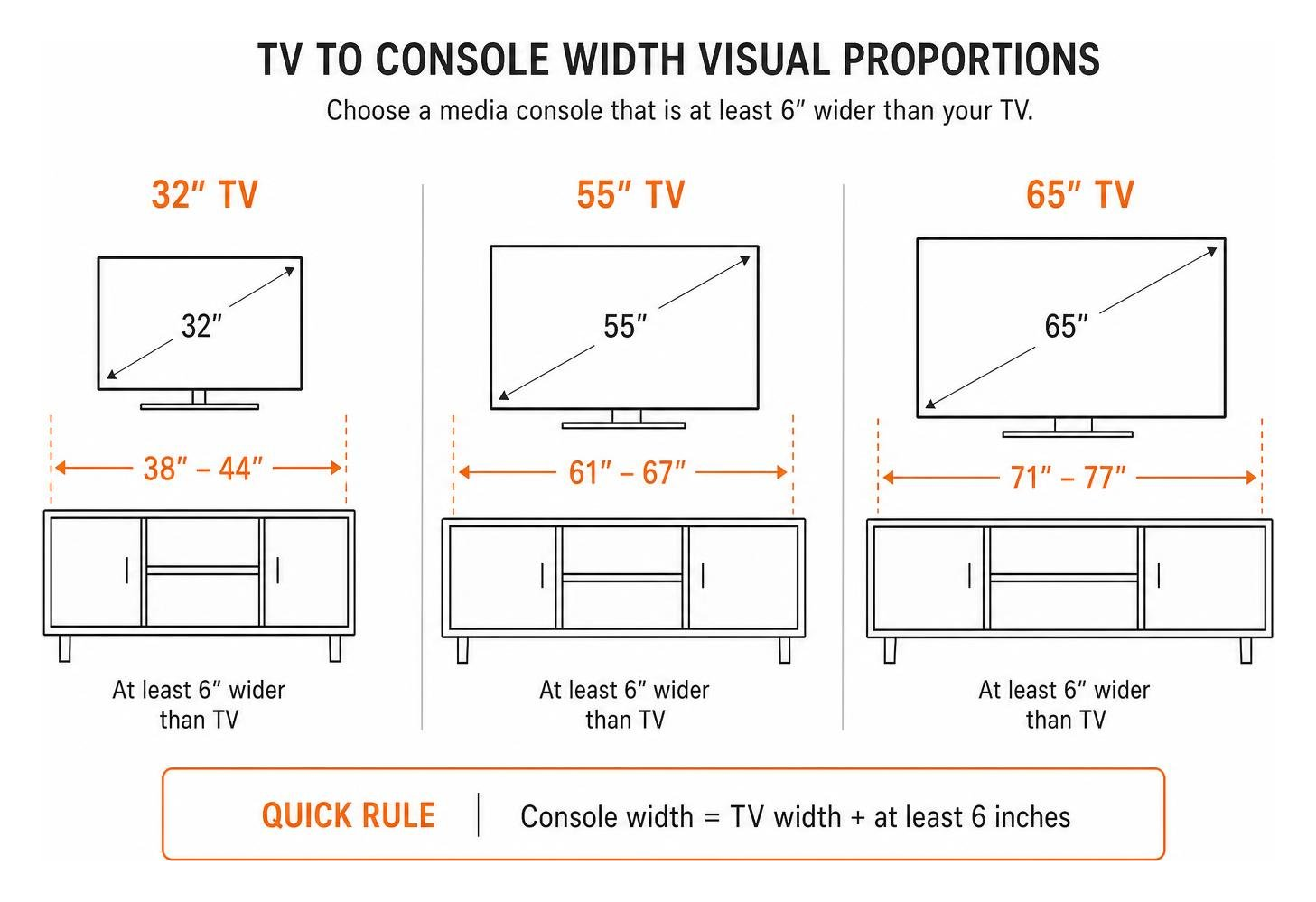
A primary rule for proportional balance is selecting a media unit that is at least six inches wider than the outer edges of your television screen frame (providing a 3-inch margin on each side). For example, a compact 32-inch television paired with a 38- to 44-inch console maintains visual harmony while providing generous space for decorative accent items or tabletop speakers.
Cabinet depth is equally critical for proper functionality. Standard high-fidelity audio equipment and multi-channel AV receivers require internal shelf depths between 15 and 18 inches. Always measure the full depth of your hardware—including protruding control knobs on the front and output plugs on the back—before selecting shallow cabinet profiles.
Measuring Clearance and Hardware Space
Electronic components generate heat and require extra breathing space behind them for heavy-gauge power cords and stiff HDMI connections. Allow at least 2 to 3 inches of interior rear clearance beyond hardware depth so cords do not bend at severe, damaging angles.
When planning wall-hung modular units, account for vertical clearance as well. Floating systems that utilize suspension rails typically require a minimum 2-inch gap between the top frame edge and the ceiling or crown molding to allow proper lifting and latching onto heavy-duty mounting brackets during installation.
Wall-Mounted Floating Consoles vs. Floor-Standing Designs
Choosing between floating wall-hung units and floor-standing cabinets involves weighing visual aesthetics against structural support requirements, storage needs, and mounting complexity.
| Feature / Metric | Wall-Mounted Floating Consoles | Floor-Standing Media Cabinets |
|---|---|---|
| Floor Clearance | Completely open; facilitates easy cleaning | Rest directly on floor or low feet |
| Weight Capacity | Heavily dependent on wall anchors/studs | Extremely high; supports 150–200+ lbs |
| Visual Footprint | Airy, weightless modern aesthetic | Anchored, substantial furniture presence |
| Installation | Requires precision levelling and stud alignment | Minimal assembly; standard positioning |
| Safety Factor | Must be securely bolted to structural studs | Stable base; benefits from anti-tip straps |
Load Capacities and Mounting Requirements
Floating cabinets excel at opening up floor space and making smaller rooms feel larger, but their total weight capacities depend strictly on wall material and installation methods. Drywall alone cannot support heavy media assemblies; mounting lag screws must drive directly into solid wooden wall studs or structural masonry.
Exceeding specified floating weight ratings risks severe wall damage or total unit detachment. Floor-standing designs remain superior for holding heavy high-fidelity audio receivers, heavy power amplifiers, subwoofers, and massive physical media collections that require maximum load stability.
Pros and Cons of Standing vs. Floating Designs
Floating consoles deliver a sleek modern look and make robot vacuums or daily floor cleaning effortless. However, their lower physical profile limits internal storage capacity and demands rigorous mounting precision during placement.
Floor-standing designs provide maximum internal storage volume, flexible shelf weight limits, and easier integration of integrated wire management channels. For homes needing expansive organization throughout the living room, combining deep floor storage with comprehensive closet system installation principles ensures every media component, gaming peripheral, and cable hub has a designated home.
Essential Features and Material Selections
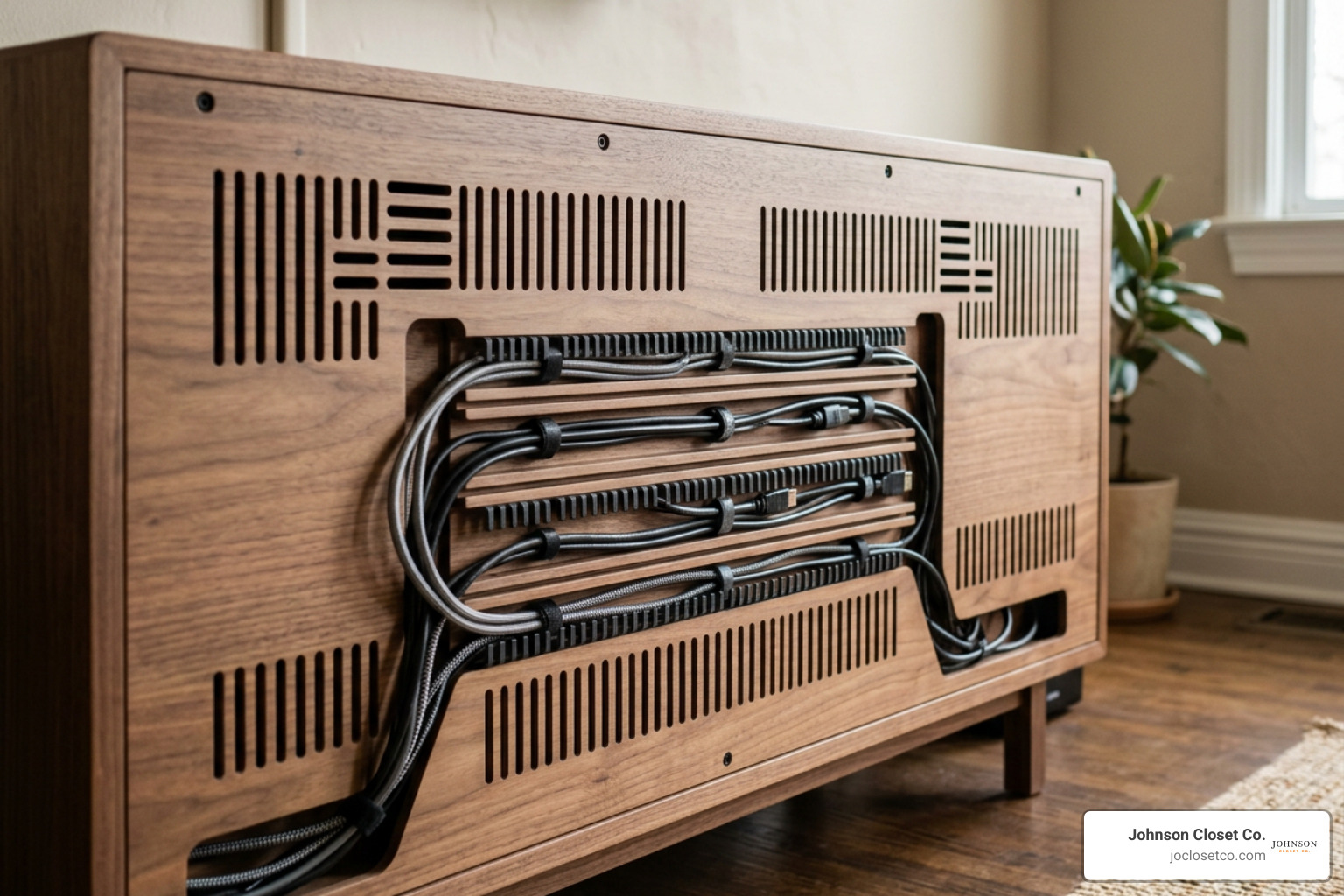
Modern media cabinets must do more than hold weight; they need integrated features that actively preserve electronic components, manage cables, and enhance overall interior aesthetics.
Storage and Hardware Features in Modern Media Cabinets
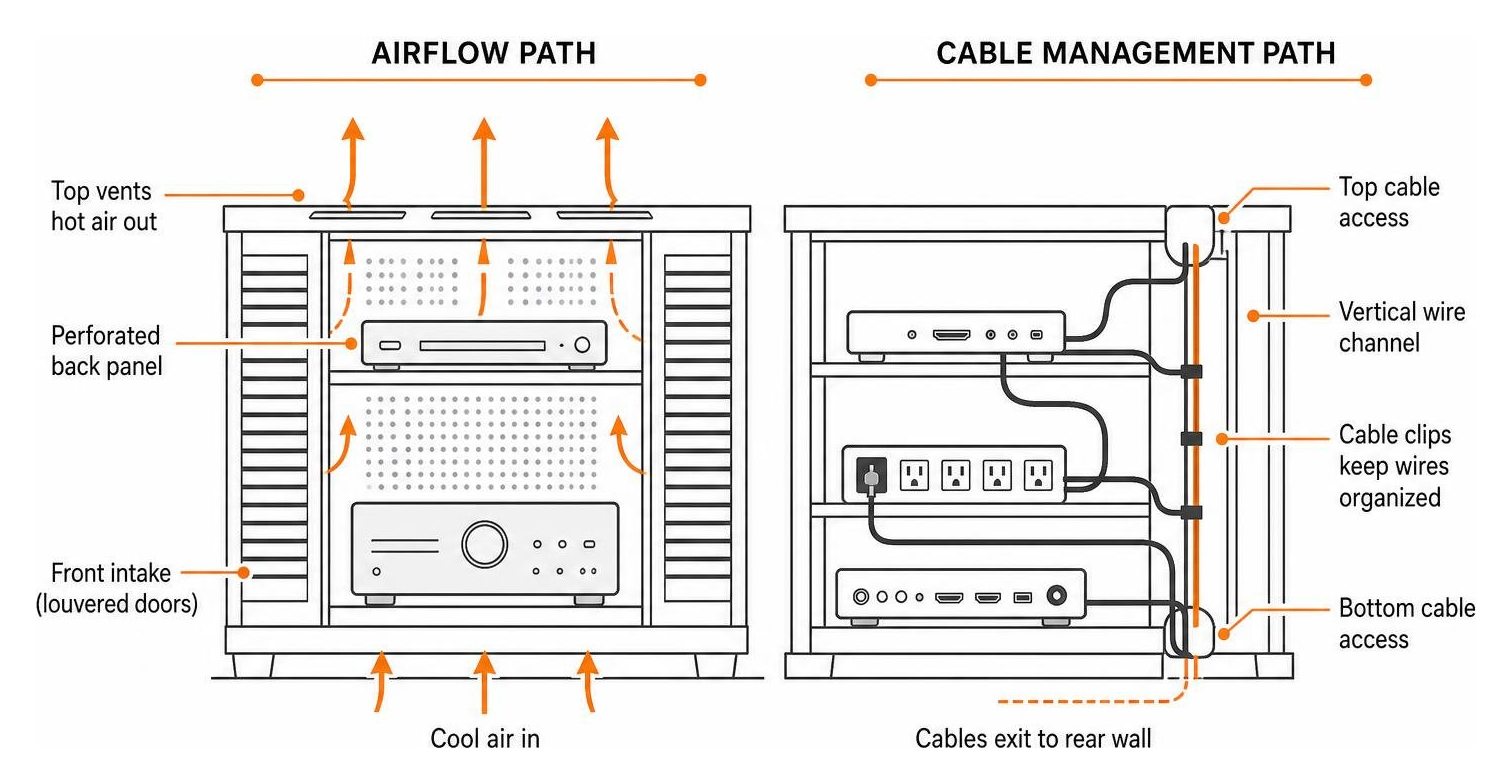
Trapped heat is the primary cause of early electronic component failure in media setups. Slatted cabinet doors, louvered vents, and perforated back panels allow natural convection airflow, dissipating heat generated by gaming consoles, cable boxes, and AV equipment even while cabinet doors remain fully closed.
Integrated cable pass-through channels let power cords route cleanly through lower access ports directly to wall outlets, preventing tangled cords behind the cabinet while keeping power strips tucked away neatly out of view.
Materials, Finishes, and Aesthetic Integration
Material choice directly influences overall cabinet durability, resistance to wear, and style matching across your home:
- Solid Wood & Veneers: Oak, walnut, and cherry offer structural strength, unique grain beauty, and timeless architectural appeal.
- Engineered Wood & Laminates: Cost-effective, highly stable, lightweight options available in sleek matte, crisp white, or textured faux-wood finishes.
- Metal & Glass Accenting: Brass trim, powder-coated steel leg bases, and smoked tempered glass doors add industrial or Art Deco elegance.
When balancing media storage with wider room styling—such as during a comprehensive custom closet remodel scottsdale home update—select wood tones and hardware finishes that echo surrounding architectural trim and built-in features.
Converting Non-Traditional Spaces into Entertainment Hubs
Converting secondary residential zones like garages, bonus rooms, or unfinished basements into dedicated media lounges is a popular strategy to expand active living space without adding square footage to your home layout.
Adapting Garages and Unfinished Rooms
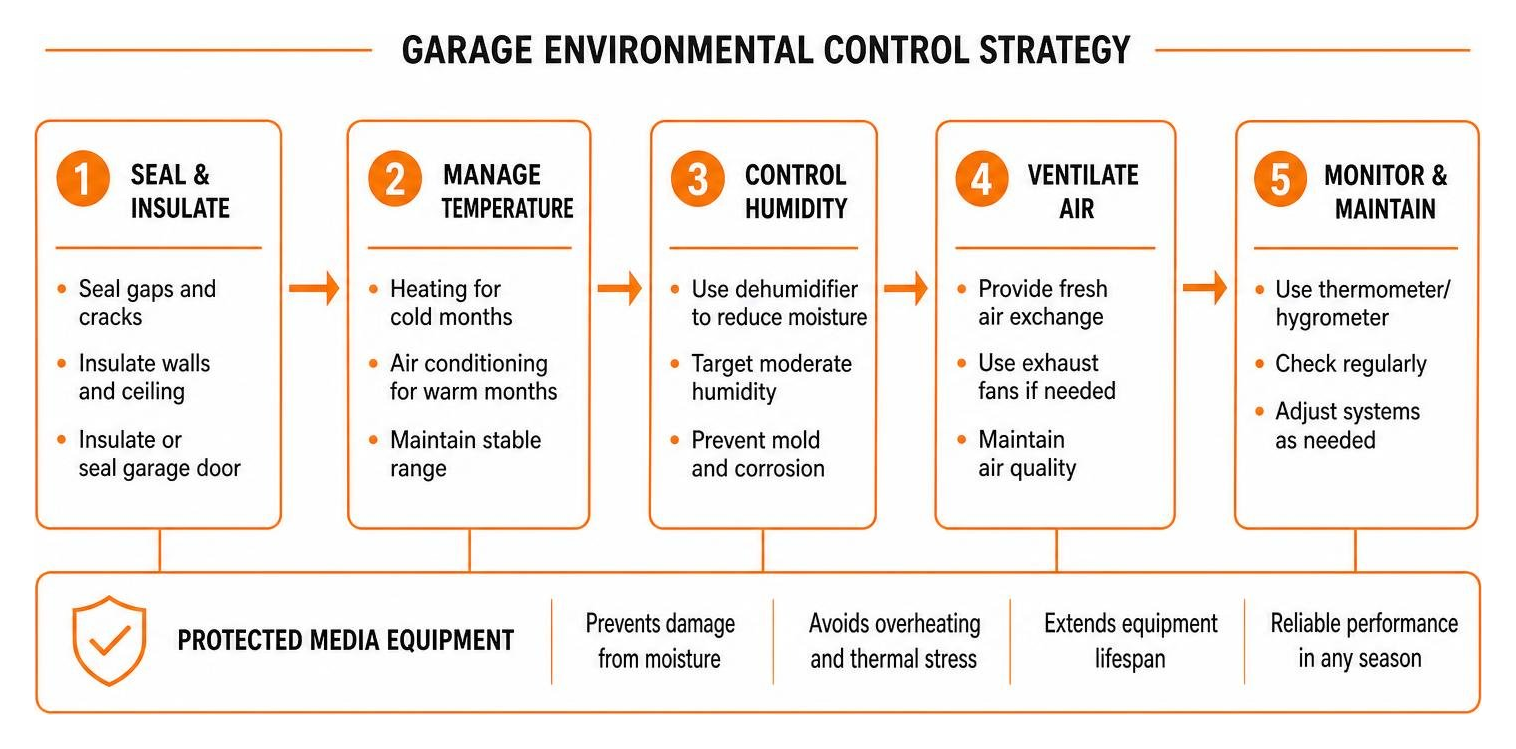
Transforming a garage or basement into a fully functional entertainment room requires addressing unique environmental factors that do not affect standard living rooms:
- Moisture and Flooring: Standard concrete slab floors absorb moisture and drop temperature quickly. Installing protective epoxy coatings or interlocking floor tiles creates a smooth, stain-resistant, and high-gloss floor base suitable for media space conversion.
- Climate Control & Humidity: Unconditioned garages experience dramatic seasonal temperature shifts. Avoid delicate, unsealed wooden furniture, which can warp, swell, or crack under unconditioned ambient swings. Instead, use custom-sealed or moisture-resistant cabinetry designed for harsh conditions.
- Perimeter Storage Integration: Keep original garage tools, lawn hardware, and overflow seasonal goods hidden behind full-height perimeter wall cabinets or overhead steel storage racks. Incorporating custom wall units—similar to modern pantry cabinets—keeps utility items completely out of sight while maintaining an inviting, high-end media lounge environment.
Frequently Asked Questions
How much wider should a console be than the television?
A media console or cabinet should be at least six inches wider than the frame of your television (three inches of overhang on each side). This 6-inch width buffer ensures visual balance, keeps the television from looking top-heavy, and leaves space for decorative items or desktop speakers.
How do slatted doors prevent electronics from overheating?
Slatted or louvered doors feature angled wooden or metal slats separated by narrow air gaps. These openings permit natural convection cooling by letting warm air escape while cooler room air enters the unit. Slats also allow infrared (IR) remote signals to pass through directly to set-top boxes without leaving cabinet doors open.
What ceiling clearance is required for wall-mounted suspension rails?
When mounting floating wall cabinets using a continuous suspension rail system, maintain a minimum of 2 inches of clearance between the top frame edge of the cabinet and the ceiling. This clearance allows you to lift the cabinet high enough to hook securely over the wall rail before locking it into place.
Conclusion
Choosing the ideal media cabinetry requires balancing accurate room measurements, ventilation needs, cable management, and material selections. Whether you need a floating modern console or an enclosed floor cabinet, selecting furniture tailored to your space elevates your home entertainment experience.
At Jo Closet Co., we specialize in designing and installing custom entertainment centers, garage cabinetry, and organized storage systems tailored precisely to your home. Serving Phoenix Valley, Scottsdale, Gilbert, Chandler, Mesa, and Tempe, our team utilizes precision CNC in-house manufacturing to deliver exact-fit, built-in cabinetry that maximizes both function and style.
Ready to transform your home with tailored custom storage designs? Contact our local design experts today to create your ideal media center!