
Why a 100 Inch Long TV Stand Matters for a Big-Screen Setup
Why a 100 Inch Long TV Stand Matters for a Big-Screen Setup
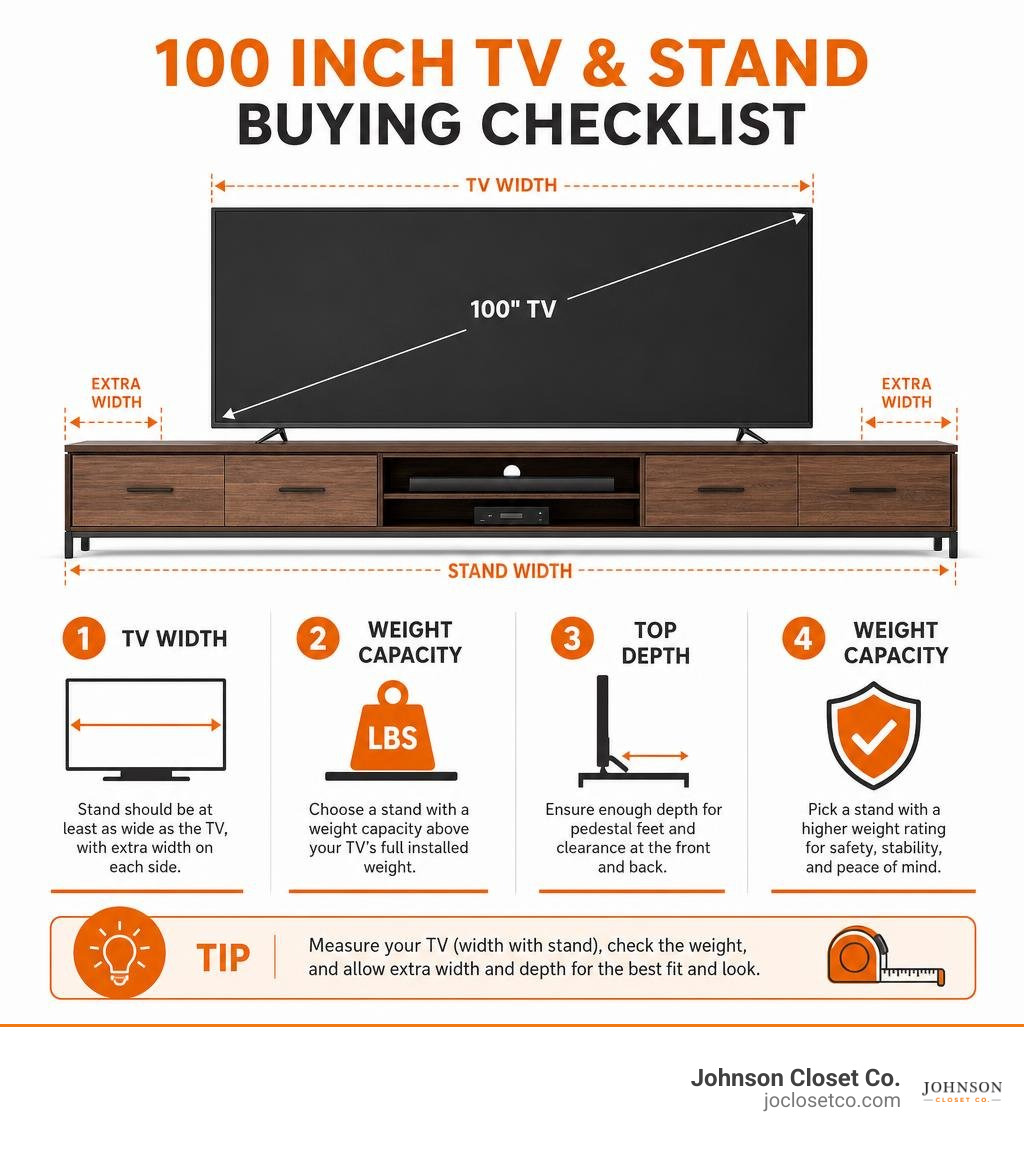
A 100 inch long tv stand gives a 100-inch television the stable, balanced base that a standard media console often cannot. The key is to shop by your TV's actual width, weight, pedestal depth, and VESA pattern - not screen size alone.
| Quick buying check | What to look for |
|---|---|
| Stand width | At least as wide as the TV, with extra width on each side for a more balanced look |
| Weight capacity | A rating above the TV's full installed weight, including its factory stand if it will sit on top |
| Top depth | Enough room for the TV's pedestal feet and a little clearance at the front and back |
| Construction | Solid wood, quality engineered wood with a reinforced frame, or steel support for long spans |
| Storage | Adjustable shelves, enclosed cabinets, cord cutouts, and ventilation for media gear |
For perspective, a current 100-inch TV can be about 88 inches wide and weigh roughly 150 pounds with its pedestal attached. That means an extra-long console is not just a style choice. It needs to manage real weight, wide spacing, cables, streaming gear, game consoles, and the visual scale of a very large screen.
A long cabinet-style media console can hide the clutter and work as a buffet or credenza. An open-frame floor stand uses less visual space and can mount the screen without drilling into the wall. The right choice depends on how much storage you need, whether you rent or own, and how permanent you want the setup to feel.
I’m Chris Johnson, and next we’ll look at how to choose the right width and proportions before you commit to an oversized media stand.
Choosing the Right 100 Inch Long TV Stand for Big Screens
Bringing home an extra-large television is an exciting upgrade, but placing a massive display on a standard-sized media console immediately reveals a major design mismatch. In living room decor, large television screens create substantial visual weight. If your console is too narrow, the screen appears top-heavy and unstable, completely off-balance with the rest of the room.
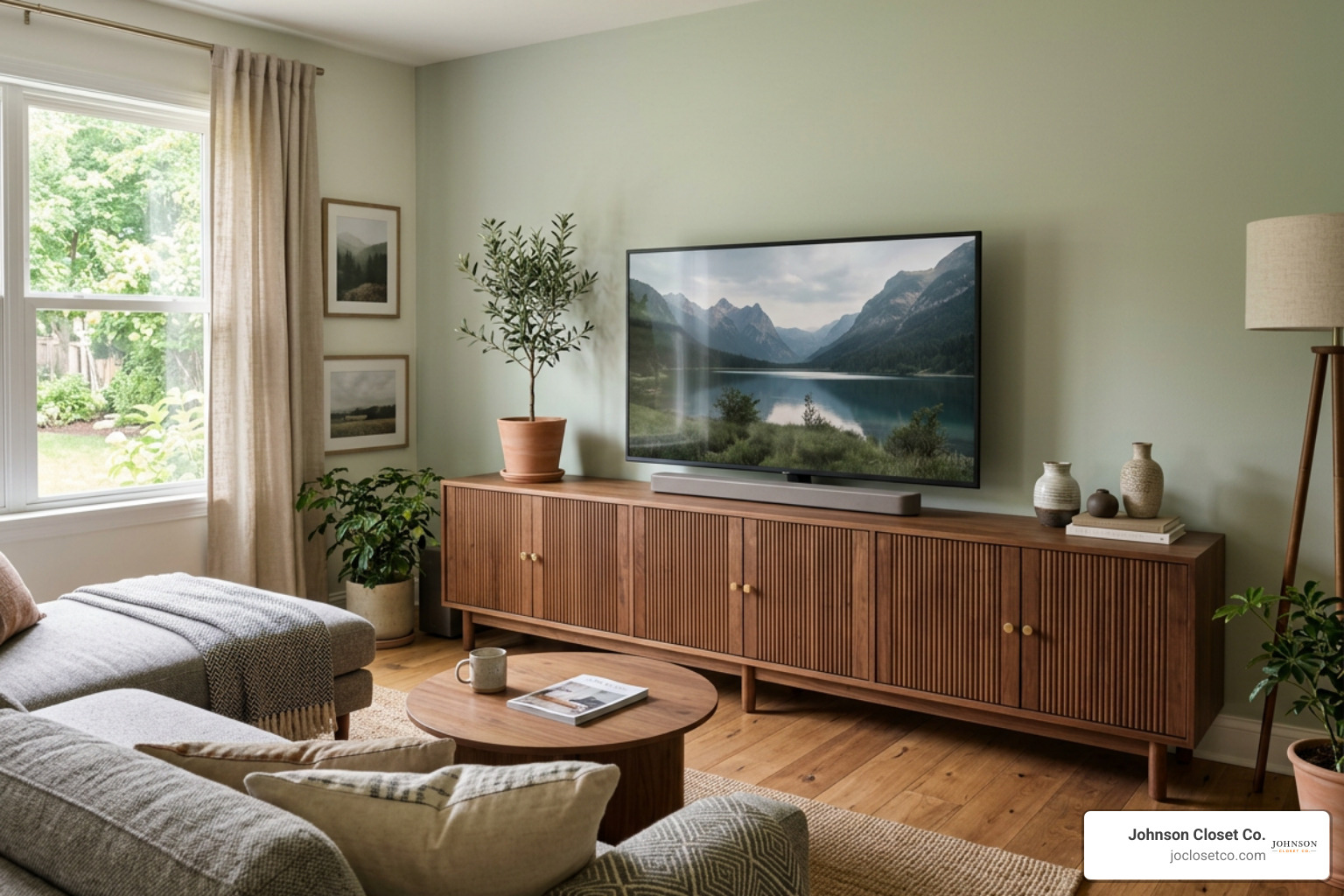
Choosing a 100 inch long tv stand creates an anchor for your media wall. In modern interiors, an extra-wide furniture footprint grounds the entertainment area, allowing the display to integrate seamlessly into your space rather than overpowering it. To create a cohesive look, evaluate your room's layout, seating distances, and traffic flow before picking a cabinet or floor mount.
Sizing and Proportions for a 100 Inch Long TV Stand
One of the most common pitfalls when buying living room furniture is confusing diagonal screen size with actual physical width. A display advertised as a 100-inch screen is measured diagonally from corner to corner. However, its actual physical width across the frame is noticeably smaller.
For example, the LG 100" QNED evo AI Mini LED 4K Smart TV features an 87.8-inch physical width, stands 54.0 inches high with its pedestal base attached, and weighs 150.1 lbs. Its factory pedestal base requires a surface depth of at least 16.3 inches.
Knowing these exact numbers is crucial:
- Physical Screen Width: ~87.8 inches
- Screen Footprint Depth: 16.3+ inches (depth needed for pedestal feet)
- Total Installed Weight: 150+ lbs
When selecting a console, ensure the surface depth accommodates the TV’s pedestal legs with at least 1 to 2 inches of safety clearance along both the front and rear edges.

Stand Width vs Screen Width Balance
To achieve proper visual balance, the media furniture beneath your display should be wider than the physical screen itself. Placing an 87.8-inch wide TV on an 80-inch console creates overhang, which creates a tip hazard and looks awkward in your home.
| Display Width | Ideal Console Width Range | Visual Margin per Side | Visual Result |
|---|---|---|---|
| ~88 Inches (100" Class TV) | 94 to 96 Inches | 3 to 4 Inches | Clean, precise aesthetic |
| ~88 Inches (100" Class TV) | 100 to 112 Inches | 6 to 12 Inches | Spaciously proportioned, grand anchor wall |
A 100 inch long tv stand (or an extended unit measuring up to 112 inches wide) provides a generous margin on both sides of the screen. This side clearance allows the frame to align with the furniture below, leaving extra surface area for decorative accents, soundbars, or bookshelf speakers.
Essential Specifications: Weight Capacity, VESA Mounts, and Materials
When dealing with displays that exceed 100 lbs, structural engineering takes priority over surface aesthetics. Large screens exert significant static loads over time, which can cause unsupported wooden spans to sag in the middle if proper bracing is absent.
Weight Capacities for 100-Inch Displays
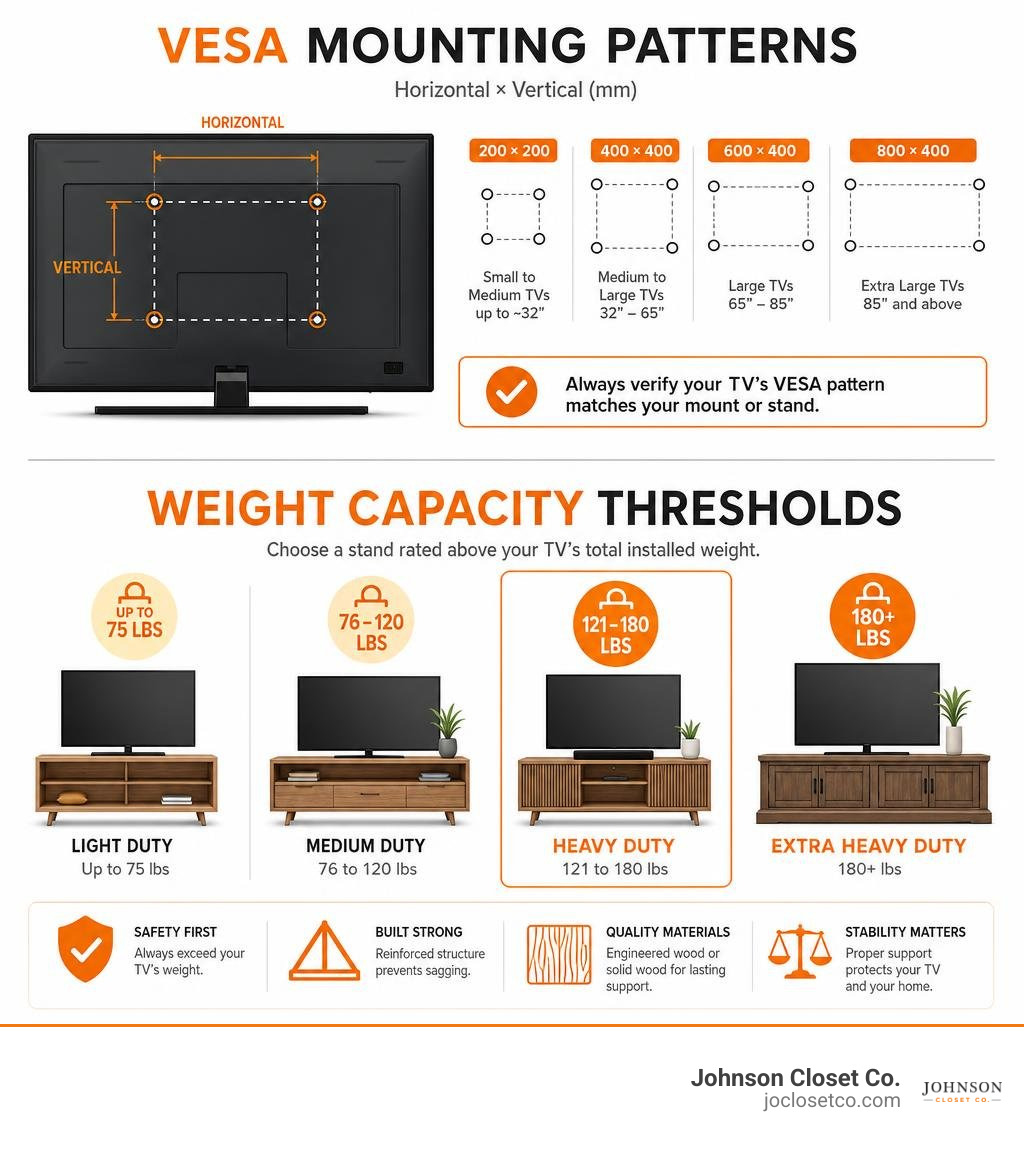
A standard off-the-shelf media cabinet might carry a maximum weight rating of 75 to 100 lbs, which falls far short of what high-end, 100-inch displays require. Ultra-large televisions weigh anywhere from 120 lbs to over 160 lbs, requiring a stand rated for at least 180 to 200 lbs to maintain structural safety.
To safely accommodate heavy displays, high-capacity consoles rely on durable materials and reinforced designs:
- Cold-Rolled Steel Structures: Heavy-duty steel dual-pillar frames and structural steel sled legs prevent bending under high static weights.
- Engineered Composite & Hardwood Solids: Thick, high-density core panels reinforced with center support legs ensure the top surface remains flat across spans over 90 inches.
- Slate and Tempered Bases: Ultra-heavy natural slate or thick tempered glass bases lower the center of gravity, preventing accidental tipping.
For example, specialized open-frame floor mounts engineered for extra-large screens offer weight capacities ranging from 143 lbs up to 187 lbs. Meanwhile, extra-wide industrial wood consoles built with steel sled bases can support surface loads up to 200 lbs or more.
VESA Patterns and Mounting Alignment
If you plan to use an open-frame stand or a console with an integrated mounting column, verifying VESA compatibility is non-negotiable. VESA (Video Electronics Standards Association) refers to the four-hole threaded mounting pattern on the back of your television.
Standard VESA patterns for 85-inch to 100-inch televisions commonly range from 600x400mm up to 800x600mm or 900x600mm. Always measure the horizontal and vertical distance between the mounting holes on your TV before buying a stand.
If your television features an ultra-wide mounting pattern (such as 850x400mm or 850x600mm), check if the stand manufacturer includes VESA extension brackets or offers custom mounting kits to guarantee a secure fit.
Storage Features and Functional Design Styles
Media furniture should keep your living area clean, organized, and free of clutter. Choosing between enclosed cabinets, open floor mounts, and hybrid consoles depends heavily on your storage needs and personal style preferences.
Enclosed Cabinet vs Hybrid 100 Inch Long TV Stand Designs
Traditional cabinet-style consoles measuring 94.5 to 112 inches wide provide maximum internal storage. They give you a place to tuck away media equipment, gaming gear, remotes, and wiring.
Key features to look for in enclosed media cabinets include:
- Fluted Cabinet Doors: Textured wooden doors conceal AV components while adding warmth and architectural detail to your room.
- Adjustable Internal Shelving: Customizable shelf positions make it easy to fit tall AV receivers, subwoofers, or gaming consoles.
- Integrated Power Hubs: Built-in power strips featuring multiple AC outlets and USB ports let you power gear directly inside the cabinet, eliminating messy extension cords.
- High-Gloss and Accent Finishes: High-gloss reflective doors combined with metallic legs create a sleek visual look that brightens modern rooms.
Open Frame and Easel Floor Mount Alternatives
If you prefer a lightweight, modern look—or if you rent your home and cannot drill into wall studs—open-frame easel floor stands offer an appealing alternative to traditional, bulky cabinetry.
Easel-style frames utilize architectural metal legs and heavy-duty steel pillars to hold ultra-large screens close to the wall. These units take up minimal floor space while elevating your TV to eye level. Many models incorporate floating wooden shelves beneath the TV bracket to hold soundbars, streaming devices, or game consoles.

Multi-Purpose Usage as Buffet Sideboards or Credenzas
An extra-wide media console measuring over 90 inches long does not have to serve only as a TV unit. Thanks to its generous length and storage capacity, an extra-long console can easily double as a dining room sideboard, entryway credenza, or living room accent table.
When wall-mounting your display above a console, the top surface becomes a stylish display area for framed photos, books, or art. For homeowners in the Phoenix Valley looking for a seamless, continuous look across an entire wall, investing in custom storage solutions ensures every inch of storage is tailored specifically to your home’s dimensions.
Safety Features, Cable Management, and DIY Assembly
Because 100-inch televisions represent both a major financial investment and a heavy physical load, safety features and easy assembly are essential considerations.
| Console Type | Weight Support Range | Typical Storage Capacity | Floor Footprint | Installation Style |
|---|---|---|---|---|
| Traditional Cabinet Console | 150 - 200+ lbs | Maximum (Enclosed cabinets, drawers, shelves) | Wide surface area (15" to 20" deep) | Freestanding flat-pack assembly |
| Open-Frame Floor Mount | 120 - 187 lbs | Minimal (1 to 2 small open shelves) | Ultra-compact (Slim depth) | Single-pillar assembly, no wall drilling |
| Hybrid Floor Mount with Storage | 140 - 180 lbs | Moderate (Integrated low cabinet + floor column) | Balanced footprint | Frame assembly attached to base unit |
Anti-Tip Kits and Heavy-Duty Bases
When placing a 150-lb screen on top of a console, stability is crucial—especially in homes with active pets or small children.
Must-have safety hardware includes:
- Steel Anti-Tip Wall Anchor Kits: Heavy-duty straps or steel cables anchor the top rear panel of the media cabinet directly into wall studs to prevent tipping.
- Enlarged Counterweighted Bases: Heavy slate, cast iron, or thick tempered base plates lower the furniture's center of gravity.
- Adjustable Leveling Foot Pads: Threaded leveling feet absorb small floor irregularities, preventing wobbles on tile, hardwood, or carpet.
Integrated Cable Channels and Wire Ventilation
Modern entertainment hubs require multiple power cables, HDMI cords, and audio wires. A well-designed 100 inch long tv stand includes built-in cable management features to keep cords neatly hidden away.
Look for back panels equipped with pre-drilled cable cutouts and hidden routing channels. Enclosed media cabinets housing heat-generating electronics should also feature rear ventilation slots or open back panels to promote steady airflow, protecting your gaming consoles and AV receivers from overheating.
Assembly Complexity and Required Installation Tools
Assembling an extra-wide media console involves handling long, heavy wood panels and structural metal hardware.
- Tool Requirements: Most units include hex keys and standard hardware, though having a power screwdriver and a level nearby speeds up the build process.
- Assembly Time: Standalone metal easel mounts take roughly 30 to 45 minutes to assemble. Fully enclosed wooden media centers can take 1.5 to 3 hours.
- The Two-Person Rule: While one person can assemble most floor stands or cabinets, always use two adults when lifting and positioning a 100-inch display onto the stand or mounting brackets.
For homeowners in Scottsdale, Mesa, or Tempe who prefer a turn-key installation experience without flat-pack DIY headaches, choosing custom-built custom entertainment centers provides precision fit, built-in cable routing, and professional wall integration tailored to your exact floor plan.
Frequently Asked Questions About Extra Wide TV Stands
What is the maximum weight capacity needed for a 100-inch TV stand?
A 100-inch television typically weighs between 120 lbs and 155 lbs on its own. To safely support the screen along with soundbars, gaming consoles, and media gear, choose a stand rated for at least 180 to 200 lbs on its main top surface or mounting column.
Can an extra-long TV stand be used as a dining buffet or sideboard?
Yes! Consoles measuring 90 to 112 inches long feature proportions similar to high-end dining sideboards and entryway credenzas. Multi-door models with fluted or wood-grain cabinet fronts provide excellent hidden storage for dining dinnerware, linens, or household items.
Do I need to drill into wall studs when using a hybrid floor mount TV stand?
No. Heavy-duty hybrid floor mounts use counterweighted slate or steel bases combined with strong vertical pillars to hold displays up to 100 inches safely. This freestanding design is ideal for renters or rooms where drilling into wall studs is restricted.
Conclusion
Choosing a 100 inch long tv stand is the most reliable way to balance, support, and anchor an extra-large screen in your home. By evaluating your display's actual physical width, total weight, and VESA pattern—rather than relying on screen size alone—you can select a media setup that delivers everyday safety and long-lasting style.
At Johnson Closet Co., we specialize in designing and installing custom entertainment centers and tailored storage solutions for homeowners throughout the Phoenix Valley, including Scottsdale, Gilbert, Chandler, Mesa, and Tempe. Using precision CNC manufacturing right here in Arizona, we create custom built-in media walls engineered to hold big-screen displays and media gear with clean, exact-fit craftsmanship.
If you're ready to upgrade your living room with a precision-built media center, explore our custom living room options today at Johnson Closet Co. custom entertainment centers and let us help you build the ideal entertainment space for your home!